

MLS Syndication for Brokers: Control, Feeds, and Compliance
MLS Syndication for Brokers: Control, Feeds, and Compliance

MLS syndication is the process by which a Multiple Listing Service pushes a broker’s active listings out to third-party consumer portals like Realtor.com and Zillow. The broker-in-charge, not the individual agent, holds final control over which listings go where. Before you publish anything, check your office’s broker syndication dashboard settings first.
That single fact trips up more agents than any technical glitch ever will.
- Syndication moves data from your MLS to public-facing portals, not to other brokers.
- Your broker’s account settings decide which publishers can receive your listings.
- RESO data standards govern how that information is formatted and transmitted.
- AgentWrite can help you write MLS-accurate remarks once your feed settings are sorted.
Key Takeaways
MLS syndication works when the broker-in-charge controls publisher settings, listings meet required MLS fields, and syndication logs get checked regularly for errors.
| Point | Details |
|---|---|
| Broker controls syndication | Agents can only select portals their broker has already enabled through the office dashboard. |
| Syndication differs from IDX | IDX shares data broker-to-broker; syndication pushes listings to consumer portals like Zillow. |
| Required fields block syndication | Missing price, status, or photos typically stops a listing from syndicating at all. |
| Copyright sits with the broker | Photo and description copyright, plus DMCA exposure, generally belongs to the brokerage. |
| Web API cuts sync lag | RESO’s Web API moves feeds toward near-real-time updates, replacing legacy nightly batch files. |
Table of Contents
- What MLS syndication is and why it matters for brokers and agents
- How syndication differs from IDX and back-office feeds
- Who controls syndication and how to opt in or out
- How syndication actually moves listing data
- Common publisher channels and the role of ListHub
- Data licenses, copyright, and seller opt-out rights
- Reading syndication logs and fixing common errors
- Pre-listing and publish checklist for syndication
- What’s changing with RESO Web API and real-time feeds
- Managing syndication without losing your marketing edge
- Let AgentWrite handle the copy while you handle the strategy
- Frequently Asked Questions
- Sources
What MLS syndication is and why it matters for brokers and agents
MLS syndication takes your active listing data and routes it to consumer-facing sites so buyers searching Zillow or Homes.com see your listing without you lifting a finger. NAR’s own policy language treats this as distinct from other data-sharing arrangements, and that distinction shapes who’s liable when something goes wrong.
The upside is obvious: automated reach across dozens of platforms without manual re-entry. The trade-off is control. Once a listing syndicates, publishers may format it differently, route leads through their own systems, and hold onto your photos longer than you’d like.
- Wider exposure, especially for listings in secondary markets underserved by local sites.
- Automated distribution saves hours of manual posting per listing.
- Reporting shows where clicks and leads actually originate.
- Less control over how your brand and content appear once published.
- Data accuracy depends on your MLS entry, not the portal.
Local MLS rules and NAR guidance both function as a check on how far this automation can go before it starts creating legal exposure.
How syndication differs from IDX and back-office feeds
Agents constantly conflate these three, and the confusion causes real compliance headaches. IDX (Internet Data Exchange) lets other brokers display MLS listings on their own sites, broker to broker, under reciprocal agreements. Syndication sends listings outward to consumer portals that aren’t part of the MLS at all. Back-office feeds move data internally, powering CMAs, AVMs, and transaction management tools that never touch the public.
A quick way to picture it: IDX is broker-to-broker, syndication is broker-to-portal, and back-office feeds are broker-to-software.
| Dimension | IDX | Syndication | Back-office feeds |
|---|---|---|---|
| Who controls/opts in | Broker, via IDX agreement | Broker-in-charge, via publisher agreement | Broker or MLS admin |
| Sync frequency | Often near real-time to hourly | Every 15 minutes to hourly, publisher-dependent | Varies, often nightly batch |
| Lead routing | Displaying broker’s site | Portal-dependent, often to the portal first | N/A, internal only |
| Publisher editing rights | None, display only | Some portals allow photo/description edits | None |
| Fee implications | Usually included in MLS dues | May carry per-feed charges | Often bundled with vendor tools |
Who controls syndication and how to opt in or out
The broker-in-charge sets the master switch. Office-level settings in the MLS system determine which publisher relationships are even available to agents, and some MLS operators explicitly state that agents cannot enable a channel their broker has turned off. If your broker hasn’t opted into a publisher agreement, no amount of clicking on your end will get a listing there.
- Confirm your brokerage has signed the relevant publisher data-use agreements at the office level.
- Check the broker syndication dashboard to see which portals are currently enabled.
- At listing entry, set your Internet Display and address-visibility toggles correctly, since these interact with broker-level permissions rather than override them.
- Verify required MLS fields, since incomplete entries commonly get blocked from syndication entirely.
- Save a copy of the seller’s syndication preferences in the transaction file.
Pro Tip: Assign one person in your office, whether that’s an operations manager or the broker themselves, as the sole admin for syndication settings, and schedule a quarterly audit. Most syndication failures trace back to a setting nobody remembers changing.
How syndication actually moves listing data
Feeds work one of two ways: push or pull. In a push model, the MLS sends updates to publishers on a schedule. In a pull model, the publisher’s system polls the MLS at set intervals and retrieves whatever has changed. Most consumer portals today use pull-based polling somewhere between every 15 minutes and once an hour, though exact timing depends on the publisher’s own infrastructure.

The technical backbone increasingly runs on the RESO Web API, which replaced older flat-file exports with a normalized, standards-based structure. RESO’s Data Dictionary defines what a field like “ListPrice” or “StandardStatus” actually means across every MLS that adopts it, which matters enormously when you’re pulling data into a hundred different portal systems that all need to interpret it the same way.
Not every missing field kills a listing. Price, status, and photos tend to function as hard blocks. Miss one and the listing simply won’t syndicate at all. Other fields, like a detailed remarks section or secondary photo captions, produce only a soft warning. The listing goes out, but it looks thin next to competitors.
- Price changes and status updates (active to pending, for example) typically propagate fastest, since portals prioritize these fields.
- Photo updates can lag behind text changes because image files are heavier and some feeds batch them separately.
- A listing pulled from a legacy flat-file feed will generally show more lag than one on a Web API connection.
RESO’s own documentation frames the shift toward event-driven data access as the industry’s answer to the sync-lag complaints that have dogged syndication for years. If your listing looks stale on a portal three hours after you updated the price in your MLS, the lag usually sits with that portal’s polling schedule, not your entry.
Common publisher channels and the role of ListHub
Every major portal behaves a little differently once it has your data.
- Realtor.com pulls directly from participating MLSs and generally routes leads to the listing agent.
- Zillow accepts both direct MLS feeds and syndicated feeds, and its lead routing can vary by market and agreement type.
- Homes.com has expanded its direct MLS relationships and markets broker-level control over listing display.
- Apartments.com focuses on rental inventory and behaves differently from the sale-listing portals above, with its own feed requirements.
ListHub sits in the middle of much of this as a centralized distribution hub. Instead of your MLS negotiating separately with every publisher, ListHub maintains the publisher network and handles distribution and reporting for broker-controlled listings, which is why so many MLSs plug into it rather than building direct pipes to each portal.
Going direct to a single publisher can mean faster onboarding and more granular reporting for that one channel, but it also means managing separate agreements and separate troubleshooting for every additional destination. For most brokerages, a syndicator like ListHub trades a little speed for a lot less administrative overhead.
Data licenses, copyright, and seller opt-out rights
Every publisher relationship usually rides on a signed data-use or participation agreement, and these agreements typically spell out branding requirements, whether the publisher can edit your photos or descriptions, and who’s liable if the listing data turns out to be wrong.
Copyright sits squarely with the broker in most cases. Listing photos and written descriptions are usually the brokerage’s intellectual property, which means a DMCA takedown request for misused images or copied remarks generally has to originate from the broker, not the photographer or the listing agent alone.
Sellers also have a say. Many listing agreements include an opt-out option for internet display or syndication, and that preference needs to be documented before the listing goes live, not after a seller calls asking why their address is on five different websites.
- Publisher agreements commonly cover branding, editing rights, and liability allocation.
- Broker copyright responsibility extends to third-party misuse of photos and remarks.
- Seller opt-out preferences should be captured in writing at listing intake.
Pro Tip: Require a written photo license from your photographer before a shoot, and keep the seller’s signed syndication preferences in the transaction file from day one. Retrofitting this paperwork after a dispute is far more expensive than collecting it upfront.
Reading syndication logs and fixing common errors
Most MLS systems generate a syndication log showing destination, timestamp, and success or failure status for each feed attempt. When a listing doesn’t show up where you expect, check that log before doing anything else.
The troubleshooting order matters. Fix the problem at the MLS source first, since that’s where the data originates. Wait for the next sync cycle, which might be 15 minutes or an hour depending on the publisher. Then verify the listing on the portal itself. Contacting portal support should be your last step, not your first. Most support teams will just tell you to check your MLS entry anyway.
- Check the log for the specific failure code before assuming it’s a portal-side bug.
- Confirm required fields (price, status, photos) are complete, since these are the most common cause of a hard block.
- Compare timestamps between your MLS update and the portal’s last sync.
- Use lead-count and impression reports to spot publishers not pulling their weight.
Reporting is also your ROI tool, not just a troubleshooting log. If a publisher generates plenty of impressions but almost no leads, that’s a signal to reconsider whether it’s worth keeping enabled by default.
Pre-listing and publish checklist for syndication
Run through this before you hit publish, and again right after.
- Confirm photo licenses are signed and on file.
- Document the seller’s syndication and internet-display opt-in or opt-out preference.
- Verify all MLS-required fields are complete, especially price, status, and photo count.
- Confirm the agent contact mapping is correct so leads route to the right person.
- Check the broker’s syndication dashboard to confirm the intended publishers are enabled.
- Set the Internet Display toggle correctly at listing entry.
- Spot-check the listing on two or three major portals within 24 hours of publishing.
- Log any discrepancies and review leads weekly against the syndication report.
What’s changing with RESO Web API and real-time feeds
The biggest shift underway is the move away from nightly batch files toward event-driven, near-real-time data access through the RESO Web API. Instead of publishers waiting for an overnight export, a properly implemented Web API connection can push updates as they happen, which cuts down the lag between a price change in your MLS and that change appearing on a portal.
This won’t happen overnight across every MLS, since adoption depends on both the MLS’s own infrastructure and each publisher’s willingness to consume the new format. Ask your MLS directly where it stands on Web API rollout, and if you’re evaluating vendor tools, ask whether they’re built against production-level Web API credentials or still relying on legacy flat files.
- Real-time feeds shrink the troubleshooting window since “wait for the next sync” starts to mean minutes, not hours.
- Reporting expectations will likely tighten too, as brokers start expecting near-instant confirmation that a listing reached a portal.
- Testing windows matter: request sandbox or staging credentials before pushing a new feed connection into production.
Managing syndication without losing your marketing edge
Most broker guidance treats syndication as a settings problem: flip the right toggles and move on. That undersells how much syndication reporting can tell you about where your marketing dollars actually work. A brokerage that enables every publisher by default and never reads the reports is paying for reach it can’t measure.
The conventional advice also underweights the copyright exposure. Brokers focus on getting listings out and rarely think about what happens when a publisher keeps using a photo after a listing expires. That’s a real liability, and it’s cheap to prevent with a signed photo license upfront.
If you take one thing from this: fix your governance before you chase more portals. One admin, one audit schedule, one clear seller opt-out process. Everything downstream, from RESO Web API adoption to ListHub’s publisher reach, works better once that foundation is solid.
Let AgentWrite handle the copy while you handle the strategy
Getting syndication settings right solves distribution. It doesn’t solve the fact that every portal, and your MLS itself, wants a slightly different version of your listing description. AgentWrite generates MLS remarks, portal blurbs, and social posts from a single set of property details, entered once, in your own voice, and flags Fair Housing wording issues before you publish. That’s one less place for compliance risk to creep in while you’re focused on getting the distribution settings right.
Frequently Asked Questions
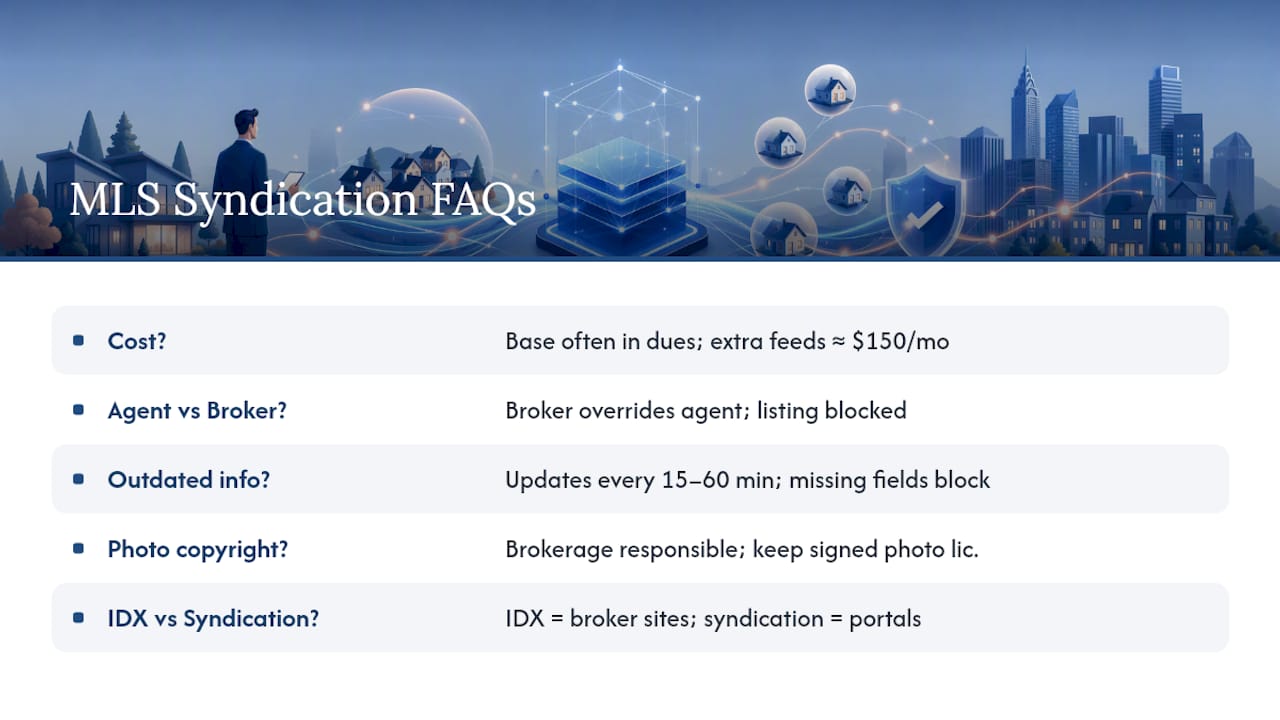
Does MLS syndication cost extra? Base syndication through your MLS is often included in membership dues, but additional or specialized feeds can carry separate charges, sometimes around $150 per month per extra feed depending on the MLS.
Can an agent enable a portal their broker hasn’t approved? No. Broker-level settings override agent selections, and a listing simply won’t appear on a channel the broker hasn’t opted into, regardless of what the agent selects at listing entry.
Why does my listing show outdated information on a portal? Usually it’s sync lag on the publisher’s side, since most feeds pull updates every 15 minutes to an hour rather than instantly, though a missing required field at the MLS level can also block updates entirely.
Who owns the copyright on syndicated photos? The brokerage typically holds copyright responsibility, which is why a signed photo license from the photographer, kept on file before syndication begins, protects you if a publisher misuses an image after a listing expires.
What’s the difference between IDX and syndication? IDX displays MLS listings on other brokers’ websites under reciprocal agreements. Syndication sends listings to consumer portals outside the MLS system entirely, like Realtor.com or Homes.com.
This article is general information, not a substitute for advice from a qualified lawyer. Consult a qualified legal professional about your own circumstances before acting on anything here.
Sources
- NAR handbook - Definition of syndication policy statement
- RESO Web API | RESO - Real Estate Standards Organization
- How MLS Listing Syndication Works: Rules and Rights - LegalClarity
- ListHub | Real Estate Listing Syndication & 500+ MLS Data Feeds