

10 Just Sold Captions You Can Post Right Now
10 Just Sold Captions You Can Post Right Now

Here are ten “just sold” captions ready to copy, personalize, and publish today. Each one hits a different tone, so you can match the caption to the property, the neighborhood, and how loud you want to celebrate.
- Celebratory: “Another one SOLD! 🎉 [Address] just closed, and we couldn’t be happier for the [buyers/sellers]. Thinking of making your next move? Send a DM.”
- Short and snappy: “SOLD. [Address]. That’s it, that’s the caption.”
- Data-driven: “SOLD quickly | multiple offers | sold over asking price. Curious what your home could do? Link in bio for a free estimate.”
- Neighborhood-focused: “[Neighborhood] just got a new set of homeowners! [Address] sold this week. If you’re curious what homes are moving for near you, ask me.”
- Funny: “This house had more drama than a reality show. Multiple offers, a bidding war, and one very happy seller. SOLD at [Address].”
- Story-driven: “From first showing to closing table in [Days on Market] days. [Address] is officially SOLD, and I loved every minute of this one.”
- Buyer-focused: “Congrats to the new owners of [Address]! Watching first-time buyers get their keys never gets old. Ready to start your search? DM me.”
- Luxury: “SOLD: [Address]. A rare find in [Neighborhood], gone in [Days on Market] days. If you’re considering a similar move, let’s talk.”
- Quote-style: “‘Home is where your story begins.’ Another chapter closes at [Address]. SOLD.”
- CTA-forward: “SOLD at [Address]! Want to know what your home is worth in today’s market? Tap the link in bio for a free valuation.”
Pro Tip: Pair your data-driven caption with an Instagram Story poll asking “Curious what homes are selling for near you?” It’s a low-effort way to surface neighbors who are quietly thinking about listing.
TL;DR:
- Captions that highlight performance metrics such as days on market, offers, or over-asking price generate more seller inquiries than simple celebrations.
- Tailoring captions to each platform’s style — concise hooks for TikTok, detailed data for LinkedIn, storytelling for Facebook — boosts engagement and lead potential.
- Pairing social posts with follow-up landing pages, neighborhood outreach, and sphere emails within two weeks maximizes lead conversion from each sale.
- Use platform-specific formatting and language while ensuring all captions are checked for Fair Housing compliance to avoid legal risks.
- Automating caption creation with tools like Agentwrite saves time, maintains consistency, and helps generate several platform-optimized posts from one set of sale facts.
Table of Contents
- Just Sold Caption Ideas Organized by Tone and Use Case
- The 3-Part Caption Formula and Fillable Templates
- Instagram, Facebook, LinkedIn, and TikTok: Adjusting Length and Hashtags
- Turning a Closing Into a Lead-Generation Sequence
- How AgentWrite Turns One Closing Into a Full Content Set
- Bringing Client Testimonials Into Your Just Sold Posts
- Pairing Captions With Photos and Video That Actually Sell
- When and How Often to Post Your Just Sold Content
- Why Most “Just Sold” Advice Undersells the Data
- Let Agentwrite Handle the Caption Writing
- Key Takeaways
- Sources
- FAQ
Just Sold Caption Ideas Organized by Tone and Use Case
Ten captions get you through today’s post. A real caption bank gets you through the next fifty closings without staring at a blank text box. Break your captions into categories, and you’ll always have something that fits the property and the mood.
1. Celebratory captions
These lean into the emotional payoff of a closed deal. Use them when the sellers are thrilled, the story is warm, or you just want to share the win.
- “SOLD and celebrating! [Address] found its perfect match. Congrats to everyone involved.”
- “The keys have officially changed hands at [Address]. Here’s to new beginnings.”
- “It’s official. [Address] is SOLD, and we are still smiling.”
Personalization swaps: Replace “new beginnings” with a specific buyer detail (first home, growing family, downsizing) and swap the closing line for a direct CTA when you want more DMs.
2. Performance-data captions
These work best when the numbers actually impress: fast sale, multiple offers, or a price over asking. Public caption banks and playbook guides consistently recommend leading with results rather than adjectives when you want seller inquiries, and a well-known caption formula backs that up.
- “SOLD quickly with multiple offers. If your home could do this too, let’s chat.”
- “[Address] closed above asking price. Want to know what your place is worth right now?”
- “Multiple offers. Fast close. Happy sellers. That’s what a strong pricing strategy looks like at [Address].”
Swaps: Toggle formality by changing “let’s chat” to “book a free valuation call,” and swap the CTA between DM, link in bio, or comment “VALUE” depending on the platform.
3. Buyer or seller story captions
These humanize the transaction instead of leading with numbers. Good for slower markets or listings with a genuine backstory.
- “They walked into [Address] during their first showing and knew instantly. SOLD.”
- “After searching for [Timeframe], this family finally found home at [Address].”
4. Neighborhood-targeted captions
Use these to plant a flag in a specific area and fish for other sellers nearby.
- “Another SOLD sign in [Neighborhood]! Inventory here is moving fast. Curious what your home could sell for?”
- “[Neighborhood] homes are in demand. [Address] just closed. Thinking about listing? Let’s talk numbers.”
5. Luxury captions
Keep these understated. Luxury buyers respond to restraint, not exclamation points.
- “SOLD: [Address]. A quiet close on a property that spoke for itself.”
- “Some homes sell themselves. [Address] is proof. Represented with discretion and care.”
6. Humorous captions
Funny works when the story genuinely has a twist, or when you want your feed to feel less like a brochure.
- “This listing had more showings than a Broadway play. SOLD at [Address].”
- “We survived the inspection, the appraisal, and three rounds of negotiations. [Address] is officially SOLD.”
- “Plot twist: the house that sat for a week got FIVE offers in 48 hours. [Address], you kept us guessing.”
Public caption libraries, including collections like Kites and Roses, publish dozens more examples in this style if you want a deeper well to pull from.
The 3-Part Caption Formula and Fillable Templates
Every strong “just sold” caption follows the same skeleton: Hook + Result + CTA. The hook grabs attention, the result gives proof, and the CTA turns a scroll into a lead. Real estate playbooks built around templates and hooks use this exact structure because it works across property types and price points.
Here’s the formula filled in eight ways:
- “SOLD! [Address] closed in [Days on Market] days. Thinking of selling? DM me for a free consult.”
- “Another win in [Neighborhood]! [Number] offers on [Address]. Want to know your home’s value? Link in bio.”
- “[Address] just sold for [Percent]% over asking. Curious what’s happening in your market? Let’s talk.”
- “From listed to SOLD in [Days on Market] days at [Address]. If you’re ready to move, I’m ready to help.”
- “SOLD: [Address]. Buyers are hungry for homes like this in [Neighborhood]. Is now the time to list?”
- “Congrats to the new owners of [Address]! Another proud moment closed out this week.”
- “[Address] SOLD above list price. Wondering what yours could fetch? Comment ‘VALUE’ below.”
- “This one moved fast. [Address], SOLD in [Days on Market] days. Ready to see what your home could do?”
Fair Housing checklist before you post:
- Never reference the buyer’s or seller’s race, religion, family status, disability, or national origin, even as a compliment.
- Avoid steering language like “perfect starter home for a young family” or “ideal for empty nesters.”
- Skip phrases like “walkable neighborhood for professionals” that can imply preference for one group.
- Stick to property facts (square footage, price, days on market) rather than assumptions about who should live there.
Pro Tip: Keep a saved note with your Fair Housing red-flag words. Scan every caption against it before you hit publish, even the funny ones.
Instagram, Facebook, LinkedIn, and TikTok: Adjusting Length and Hashtags
The same caption performs differently depending on where it lands. A line that reads sharp on TikTok looks stiff on LinkedIn, and a hashtag stack that helps on Instagram does nothing on Facebook.
- Instagram: Aim for 125 to 150 characters in the visible caption, with the rest tucked below a “more” cutoff. Use 5 to 10 hashtags mixing broad terms (#JustSold) with local ones (#[CityName]RealEstate). Best formats: a carousel post or a Reel showing the sold sign going up.
- Facebook: Longer captions perform fine here. Two to three sentences plus a CTA works well, with 0 to 2 hashtags at most. Facebook audiences respond to warmth and story more than data.
- LinkedIn: Lead with the professional angle: days on market, percent over asking, market context. Keep hashtags to 3 or fewer (#RealEstate, #JustSold), and skip anything overly casual.
- TikTok: Short, punchy, first three seconds matter more than the caption itself. Use a hook line as on-screen text and a caption under 100 characters with 3 to 5 trending or niche hashtags.
Including hard numbers, like days on market or offer count, tends to draw more seller inquiries than a purely celebratory post, according to caption playbooks built around performance data. Save the celebratory tone for Facebook and Instagram Stories, and let LinkedIn and data-driven Instagram posts do the lead-generation heavy lifting.
Turning a Closing Into a Lead-Generation Sequence
A “just sold” post shouldn’t live and die in 24 hours. Treat closing day as the start of a short campaign, not a one-off announcement.
Day-of checklist:
- Publish your caption across Instagram, Facebook, and LinkedIn within a few hours of closing, while the news is fresh.
- Link to a dedicated landing page from your Instagram bio or a Facebook post link.
- Send a short email to your sphere announcing the sale.
- Mail a “just sold” postcard to the immediate neighborhood if your farm area supports it.
Your landing page should show the sold price and address, offer a free market estimate for visitors through Ryan Case Realtor’s market estimation, and include a clear contact or booking button. Ready-made email templates, like the one from Mailmeteor, can shortcut this step if you’re not writing from scratch.
Track these metrics over the following two weeks: direct inquiries, landing page clicks, and any new leads from the same neighborhood. If nothing moves within two weeks, follow up with a shorter, data-only post rather than repeating the original caption.
How AgentWrite Turns One Closing Into a Full Content Set
Writing eight versions of the same “just sold” news for eight platforms eats up time you don’t have between showings. Agentwrite generates platform-specific captions, MLS remarks, and follow-up emails from one input: the address, sale price, days on market, and offer count.
- Enter the sale facts once; get Instagram, Facebook, LinkedIn, and TikTok-ready captions back in your chosen voice.
- Built-in Fair Housing flagging catches risky phrasing before you publish.
- Select from multiple writing voices so your captions still sound like you, not a template.
A typical workflow: you log the closing details into Agentwrite, and it returns a caption set plus a short client email, ready to review and send.
| Point | Details |
|---|---|
| Lead with results | Days on market and offer count draw more seller inquiries than celebration alone. |
| Match tone to platform | LinkedIn wants data, TikTok wants a hook, Facebook wants a story. |
| Automate the repeat work | Agentwrite drafts platform-specific captions and emails from one set of sale facts. |
Bringing Client Testimonials Into Your Just Sold Posts
A testimonial adds a voice besides your own to the celebration, and that shift in perspective tends to land harder than another agent-written sentence. If a seller texts you something like “we can’t believe how fast this sold,” ask permission to use it, then build the caption around their words instead of yours.

Try this structure: “‘We had three offers in the first weekend.’ That’s what the sellers at [Address] told us after closing. SOLD in [Days on Market] days.” The quote does the bragging so you don’t have to.
Short reviews work well as a caption opener too. Pull a line from a Google review or a text message (with permission) and follow it with the sale facts: “‘She made the whole process feel effortless.’ [Address] closed this week at [Percent]% over asking. Thinking about selling? Let’s talk.”
For video content, overlay the written quote as on-screen text while you walk through the sold property, then let your voiceover cover the numbers. That pairing gives viewers social proof and data in the same ten seconds.
One caution: never edit a client’s words to sound more dramatic, and always confirm the quote is accurate before publishing. A misquoted testimonial is worse than no testimonial at all, especially if the client sees it and feels misrepresented.
Pairing Captions With Photos and Video That Actually Sell
The caption sets the tone, but the visual is what stops the scroll. A generic sold-sign photo with a great caption still underperforms a mediocre caption with a strong visual.
Photo tips:
- Shoot the sold sign in good light, ideally golden hour, rather than a flat midday shot.
- Include the front exterior in the same framing as your original listing photo so followers can compare “before listing” and “after sold” side by side.
- If the sellers are comfortable, a genuine photo of them with the keys outperforms a staged sign photo almost every time.
Video tips:
- A 15 to 30 second walkthrough clip with your caption’s hook as on-screen text works across Instagram Reels, TikTok, and Facebook.
- Film a short clip of the sign going up, even on your phone. Authenticity beats production value here.
- If you have before-and-after footage from a renovation or staging project, a quick side-by-side clip pairs naturally with a performance-data caption.
Match the visual’s energy to the caption’s tone. A funny caption paired with a stiff real estate headshot falls flat. Save the polished, professional photos for luxury or data-driven captions, and let the sold-sign selfies carry the celebratory ones.
When and How Often to Post Your Just Sold Content
Posting a “just sold” caption the moment you close beats waiting for a “better” time slot. The news is only fresh once, and delaying it by a few days weakens the urgency that makes people comment or share.
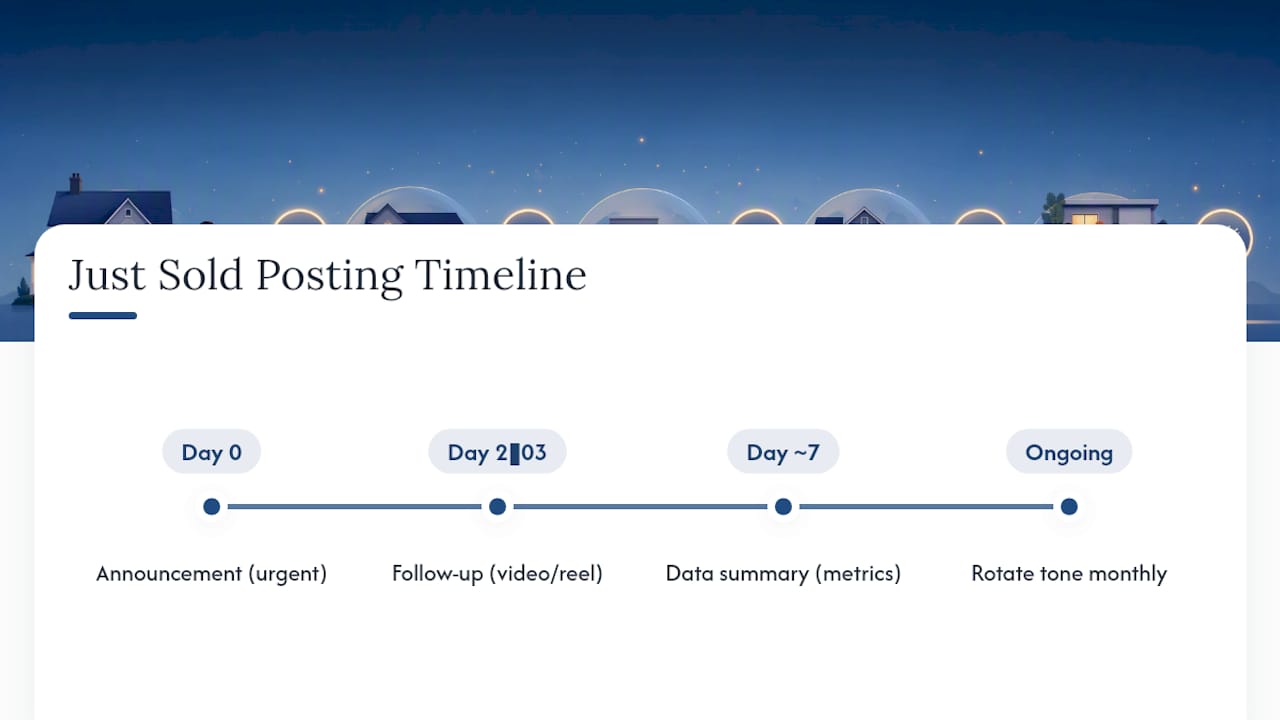
That said, one post rarely does all the work. Space your content across roughly a week: the initial announcement on closing day, a follow-up story or reel two to three days later showing a walkthrough or client reaction, and a final data-driven post around day seven summarizing the results (days on market, offer count, percent over asking) if you didn’t lead with those numbers initially.
Avoid posting more than one “just sold” announcement per platform per day, even if you closed multiple properties. Stack them into a single carousel or spread them across the week instead. Followers tune out feeds that feel like a constant sales pitch.
For agents closing multiple deals per month, rotate your caption tones so consecutive posts don’t feel identical. If last week’s post was celebratory, make this week’s data-driven or neighborhood-focused. That variety keeps your feed from reading like a template, and it gives you more angles to reach different segments of your audience: past clients, neighborhood prospects, and referral sources all respond to different tones.
Why Most “Just Sold” Advice Undersells the Data
Most agents treat a “just sold” post as a courtesy announcement: a nice gesture to the sellers, a small ego boost, and not much else. That’s a mistake. The captions that actually generate seller leads aren’t the warmest ones. They’re the ones with a number in the first line.
The conventional wisdom says lead with excitement. The stronger move is leading with proof, then letting the excitement show up in the CTA.
Where I’d push back on the typical playbook: don’t treat platform adaptation as optional. A caption copied identically across Instagram, LinkedIn, and TikTok wastes the format each platform rewards. And don’t skip the Fair Housing check because a caption feels harmless. The riskiest phrases are usually the ones that sound like a compliment.
If you take one thing from this: automate the repetitive part (platform formatting, tone variation) and spend your saved time writing better hooks and confirming your numbers are accurate.
— Tyler
Let Agentwrite Handle the Caption Writing
Agentwrite is the faster route to consistent, compliant “just sold” content compared to writing every platform version by hand or piecing together caption banks post by post. Enter your sale details once, sale price, days on market, offer count, and get back Instagram, Facebook, LinkedIn, and TikTok-ready captions in your own voice, plus a client-ready follow-up email.
Because Agentwrite flags Fair Housing wording risks automatically, you’re not manually cross-checking every caption against a compliance list before you post. That matters more the busier your closing calendar gets. Agents who close several deals a month save the most time here, since the platform reuses your voice settings across every new listing without re-explaining your tone each time.
If you’re ready to stop rewriting the same closing announcement four different ways, start a free trial at Agentwrite and generate your next “just sold” caption set from your actual sale facts.
Key Takeaways
The strongest “just sold” captions pair a specific result, days on market, offer count, or percent over asking, with a clear call to action, and platform-specific formatting multiplies their reach.
| Point | Details |
|---|---|
| Lead with proof, not adjectives | Data-driven captions with days on market or offer count tend to draw more seller inquiries than celebration alone. |
| Match caption to platform | Instagram wants a short hook and hashtags, LinkedIn wants numbers, TikTok wants a fast visual cue. |
| Extend the announcement into a sequence | Pair the social post with a landing page, sphere email, and neighborhood follow-up within two weeks. |
| Check every caption for Fair Housing risk | Avoid language that implies a preferred buyer type, even when it sounds like a compliment. |
| Automate the repeat writing with Agentwrite | Agentwrite generates platform-specific captions and follow-up emails from one set of sale facts. |
Sources
- 31+ Just Sold Captions For Instagram With Quotes - Kites and Roses
- Real Estate Captions: Instagram Templates, Hooks & CTAs
- Mailmeteor — Just Sold email template
- Real Estate Captions: 75+ Hooks That Sell Listings (2026) | Amplifiles
FAQ
What should I caption a just sold post with?
Lead with a specific result (days on market, number of offers, or percent over asking) followed by a clear call to action, like a DM prompt or a link to a free valuation.
What is a good caption for a post about selling a house?
A short celebratory line works for warmth, but a caption that includes one performance detail, such as “SOLD in 6 days with 4 offers,” tends to generate more seller inquiries.
What’s a catchy caption for a just sold post?
Short and punchy works best: “SOLD. That’s it, that’s the caption,” or a data hook like “108% of asking in under a week.” Keep it under 150 characters for Instagram.
What are some good Instagram captions for a just sold post?
Mix tone with your audience: try a celebratory line for engagement, a data-driven line for lead generation, and rotate them so consecutive posts don’t feel repetitive. Tools like Agentwrite can generate several Instagram-ready versions from the same sale details in seconds.