

Send Your Open House Email Within 24 to 48 Hours
Send Your Open House Email Within 24 to 48 Hours

Send your follow-up promptly after the open house, ideally within a day or two, and as soon as possible for anyone who asked about price or next steps. A sample subject line: “Loved having you at 214 Maple St, Sarah” (under 50 characters, first name included), paired with one clear ask: “Reply YES if you’d like a private tour this week.” That’s the whole formula. Realtor backs the timing window, and a tool like AgentWrite can draft the variations for you once you know the schedule.
Here’s the send schedule broken down by lead temperature:
- Hot leads (asked about price, requested a second showing): send within 24 hours, ideally same-day.
- Warm leads (asked questions, took a flyer, no commitment): send within 48 hours.
- Cold leads (neighbors, browsers, no engagement): send within 3 to 5 days as part of a broader nurture list.
Key Takeaways
Sending a segmented follow-up email within 24 to 48 hours of an open house, with one personal detail and a single clear CTA, converts more leads than a delayed generic blast.
| Point | Details |
|---|---|
| Send within 24 to 48 hours | Hot leads get same-day outreach; warm and cold contacts follow within days. |
| Segment by tier | Sort contacts into hot, warm, and cold based on sign-in sheet signals before choosing a template. |
| Keep subject lines short | Stay under 50 characters and lead with a name or property cue to avoid mobile truncation. |
| Use a three-sentence structure | Thank, reference a specific detail, and close with one clear call to action. |
| Automate without losing personalization | AgentWrite drafts tiered follow-ups fast while flagging Fair Housing language risks. |
Table of Contents
- Why a Prompt Open House Email Converts More Leads
- When to Send: A Simple 4-Step Follow-Up Cadence
- How to Sort Open House Contacts Into Hot, Warm, and Cold
- Subject-Line Rules and 12 Examples to Test
- What Belongs in a Short, Effective Follow-Up Email
- Five Ready-to-Send Open House Email Templates
- A Simple CRM Workflow for Fast, Consistent Follow-Ups
- Metrics That Tell You the Cadence Is Working
- Follow-Up Mistakes That Kill Response Rates, and Quick Fixes
- How AgentWrite Helps Scale Personalized Follow-Ups
- What Separates Good Follow-Ups From Great Ones
- Try AgentWrite for Faster, Compliant Open House Follow-Ups
- Sources
Why a Prompt Open House Email Converts More Leads
Momentum fades fast after a showing. A buyer who walked through your listing on Saturday has usually toured two or three other homes by Wednesday, and whichever agent reaches them first often gets the follow-up conversation. Sending a timely email does three concrete things: it locks in a private showing before a competing agent does, it moves undecided buyers into a nurture sequence before they forget your listing’s details, and it turns neighbors into referral sources while the open house is still fresh in their minds.
HousingWire’s research on follow-up timing found that segmenting messages by interest level drives noticeably higher engagement than sending the same generic thank-you note to everyone who signed in.
When to Send: A Simple 4-Step Follow-Up Cadence
The email you send after the open house is really the last step in a longer sequence, not a one-off message. A staged approach outperforms a single blast: send a save-the-date 7 to 10 days before the event, an invitation 5 to 7 days out, a sneak peek 3 to 4 days before, and a day-of reminder that morning. That pre-event rhythm is what Realtor.com recommends to maximize turnout, and Sequenzy’s template mapping uses the same 5 to 7 day window for the initial invite.
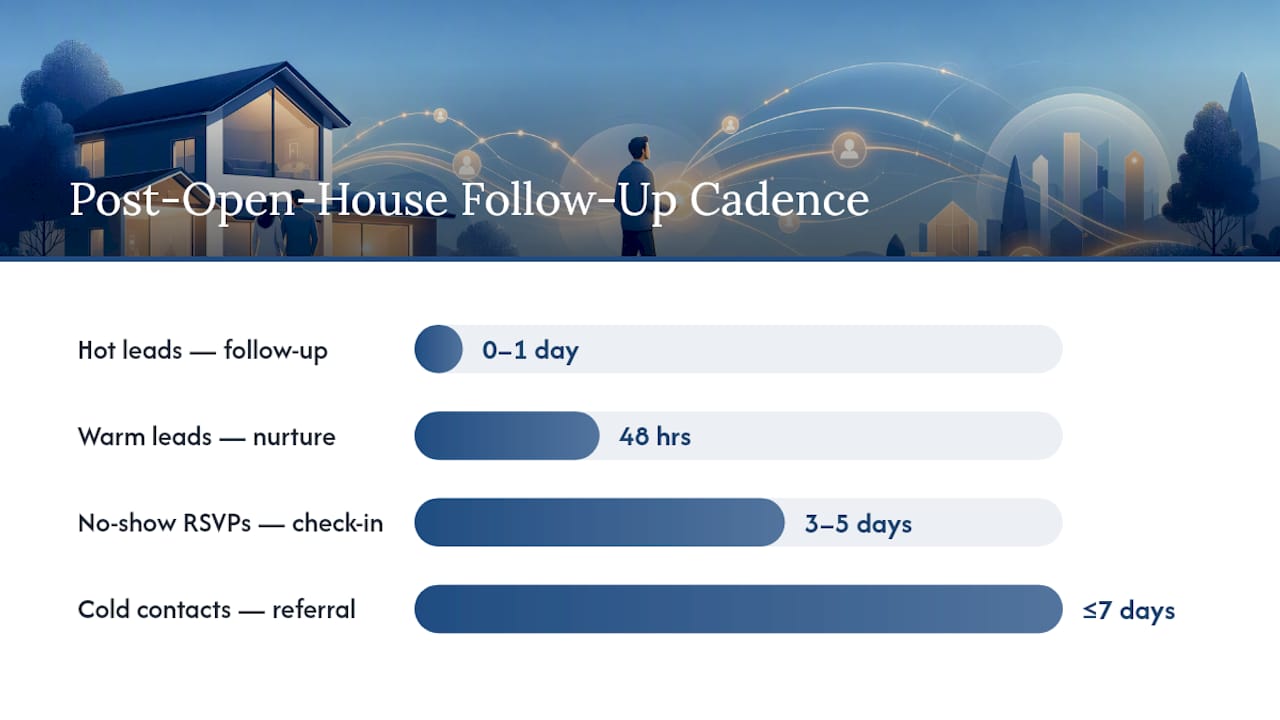
Once the open house wraps, run this cadence:
- Same day or next morning: send hot-lead follow-ups to anyone who asked for a private showing or mentioned a timeline.
- Within 48 hours: send warm-lead nurture emails to attendees who browsed but didn’t commit.
- Within 3 to 5 days: send a check-in to RSVPers who never showed up, offering a private walkthrough instead.
- Within a week: send a soft, low-pressure note to cold contacts and neighbors, focused on referrals rather than a sale.
Pro Tip: Speed matters more than polish for hot leads. Send a short, slightly rough email within the hour rather than a perfect one two days later. Save your best template writing for the warm and cold segments, where you have more runway.
How to Sort Open House Contacts Into Hot, Warm, and Cold
Your sign-in sheet is a triage tool if you read it right. Mark down more than a name and phone number: note whether someone asked about price, mentioned a moving timeline, requested a second showing, or came back through the house twice. Those are hot-lead signals. A buyer who asked general questions but gave vague answers about timing is warm. Someone who wandered in from next door or filled out the sheet without asking a single question is cold, at least for now.
Quick checklist for your sign-in sheet or CRM:
- Did they ask about price, financing, or closing timeline?
- Did they request a private showing or return for a second look?
- Did they give a phone number without being asked twice?
- Did they RSVP in advance, or walk in cold?
Pro Tip: When in doubt, treat a contact one tier hotter than you think. A slightly-too-eager email to a warm lead costs you nothing. A slow email to a hot lead can cost you the sale.
Subject-Line Rules and 12 Examples to Test
Keep subject lines short enough to avoid truncation on mobile screens, where most buyers read email first. Open with the recipient’s first name when possible, include a specific property or neighborhood cue instead of a generic phrase, skip all caps, and test a curiosity angle against a straightforward urgency angle to see which your list responds to. KSRealtyAgent’s guidance on tight subject lines and clear CTAs applies just as much to follow-ups as it does to invitations.
Twelve you can copy and adjust today:
- “Loved having you at [Address], [Name]”
- “Quick question about the kitchen you liked”
- “Ready for a private tour this week?”
- “Still thinking about [Neighborhood]?”
- “You mentioned a fall move, let’s talk”
- “Sorry we missed you Saturday”
- “A private showing, whenever works for you”
- “Thanks for stopping by, [Name]”
- “This one’s getting attention fast”
- “Your neighbors are curious about [Address]”
- “One more look before it’s gone?”
- “Here’s the offer sheet you asked about”
Preview text is prime real estate too. Use the first line of your email body to reinforce the subject, not repeat it.
What Belongs in a Short, Effective Follow-Up Email
Three sentences do the job: thank them for coming, reference one specific detail from your conversation, and give them a single next step. That’s it. A longer email doesn’t convert better, it just gets skimmed or ignored.
Before you hit send, check that your email includes:
- A personalized opening that references something they said or noticed.
- One or two property highlights, not a full feature dump.
- A single clear call to action, not three competing ones.
- Your name, phone number, and a link back to the listing or virtual tour.
- Formatting that reads clean on a phone screen, since most opens happen on mobile.
Put your CTA and the property address near the top of the message. On a phone, anything below the second paragraph might as well not exist. A visual-first invitation with a hero image and a scannable date and time block tends to pull higher click-throughs than a text-heavy layout, and the same principle carries into your follow-up.
Five Ready-to-Send Open House Email Templates
1. Hot lead, urgency Subject: “Ready for a private tour, [Name]?” Preview: “You asked about the price, let’s talk numbers.” Body: “Great meeting you at [Address] on Saturday. You mentioned the finished basement was exactly what you’re looking for. I can hold a private showing time this week, just reply YES and I’ll send you a link to pick a slot.” CTA: Reply YES.
2. Warm lead, nurture Subject: “Still thinking about [Neighborhood]?” Preview: “A few thoughts on what you saw Saturday.” Body: “Thanks for stopping by [Address]. You had good questions about the school district, so I pulled together some notes on the elementary school ratings nearby. Happy to send more listings in the area if you’re still exploring.” CTA: “Reply with your top priorities and I’ll send matching listings.”
3. Cold/browser check-in Subject: “Thanks for stopping by, [Name]” Preview: “Hope you enjoyed the walkthrough.” Body: “It was great meeting neighbors and friends at [Address] this weekend. If you know anyone looking to buy or sell in the area, I’d appreciate the introduction.” CTA: “Forward this to anyone house hunting.”
4. RSVP no-show Subject: “Sorry we missed you Saturday” Preview: “Still happy to show you around.” Body: “Noticed you RSVPed but couldn’t make it, life happens. I can set up a private walkthrough of [Address] whenever works for your schedule, even this evening.” CTA: “Reply with a day and time that works.”
5. Event follow-up with offer Subject: “Here’s the info you asked about” Preview: “Pricing, comps, and next steps inside.” Body: “As promised, here’s the offer sheet and comparable sales for [Address]. If this feels like the right fit, I can walk you through next steps on making an offer today.” CTA: “Schedule a call this week.”
Swap in the name, the specific detail they mentioned, and the neighborhood cue for each send. Keep the CTA link, whether that’s a scheduling tool or a simple “reply YES,” identical across a batch so you can track click rates easily.
A Simple CRM Workflow for Fast, Consistent Follow-Ups
Set up four steps in whatever CRM you already use: capture each lead at sign-in with tier and interest notes, tag them hot, warm, or cold, trigger the matching email sequence automatically, and set a task reminder for personal outreach the moment someone clicks a link or replies.

Limit automated sends to two or three touches before a human takes over. Insert a personalization token, at minimum a first name and one property detail, so automated emails don’t read like a mass blast. Escalate to a phone call or personal note the second a lead engages.
Pro Tip: Draft one strong template per tier, then bulk-personalize the opening line for each recipient by hand or with an AI writing tool. The body can stay templated, the first sentence can’t.
Metrics That Tell You the Cadence Is Working
Track reply rate, click-to-schedule rate, and private showing rate for each send. If those numbers dip below what you’d expect for a warm list, test a new subject line or simplify the CTA before you touch the body copy.
Use trackable scheduling links and UTM parameters on every CTA so you can see which template and tier convert best, then tag those results back into your CRM to refine future sends.
Follow-Up Mistakes That Kill Response Rates, and Quick Fixes
- Batch-and-blast messages feel impersonal. Fix: add one sentence referencing a specific detail from the conversation.
- Late follow-up loses hot leads to faster agents. Fix: set an auto-reminder the moment a sign-in sheet is entered into your CRM.
- No clear CTA leaves buyers unsure what to do next. Fix: pick one action, reply, click, or call, and cut the rest.
Skip long unsolicited MLS dumps, don’t ignore no-shows, and don’t over-email cold contacts more than once every week or two.
How AgentWrite Helps Scale Personalized Follow-Ups
- Generates personalized follow-up emails in your voice across hot, warm, and cold segments in minutes instead of hours.
- Plugs directly into templates you can drop into your CRM’s sequences.
- Flags potentially risky Fair Housing language before you hit send, alongside general compliance awareness for automated outreach.
A tailored AI workflow beats copy-pasting the same three sentences into every email, because each message still reads like it came from a person who was actually at the open house.
What Separates Good Follow-Ups From Great Ones
The agents who convert consistently aren’t the best writers. They’re the ones who send the email within hours, not days, and who reference one real detail from the conversation instead of a generic “great meeting you.” I’ve seen a single line, “you mentioned the backyard for your dog,” do more work than a paragraph of polished copy. Try the templates above this week and watch which subject line actually gets replies.
Try AgentWrite for Faster, Compliant Open House Follow-Ups
Writing five personalized email variations for every open house eats up time you don’t have between showings. AgentWrite generates listing-specific follow-ups, MLS remarks, and social posts from details you enter once, in your own voice, so you’re not starting from a blank page after every event.
A few reasons agents use it for open house follow-ups specifically:
- It drafts hot, warm, and cold variations from the same property details in minutes.
- It flags Fair Housing wording concerns automatically, before the email goes out.
- It keeps your voice consistent across dozens of leads without sounding like a form letter.
Start a trial and generate your next batch of follow-up emails at Agentwrite before your next open house wraps up.
Sources
- Realtor
- 12 Open House Follow-up Email Templates Proven to Win Clients (+Download) | HousingWire
- Open House Email Invitation Template, PDF (Updated 2025)
- Open House Invitation Templates | Sequenzy