

The Real Estate Video Script That Gets Clicks, DMs, and Showings
The Real Estate Video Script That Gets Clicks, DMs, and Showings
Use the four-beat structure, hook, address, story, call, and start recording with these five formats: listing walkthrough, just-listed teaser, neighborhood spotlight, market update, and seller tip
Each beat has a job. The hook earns three seconds of attention. The address and details section answers the practical questions fast. The story beat gives viewers a reason to picture themselves living there. The call tells them exactly what to do next.
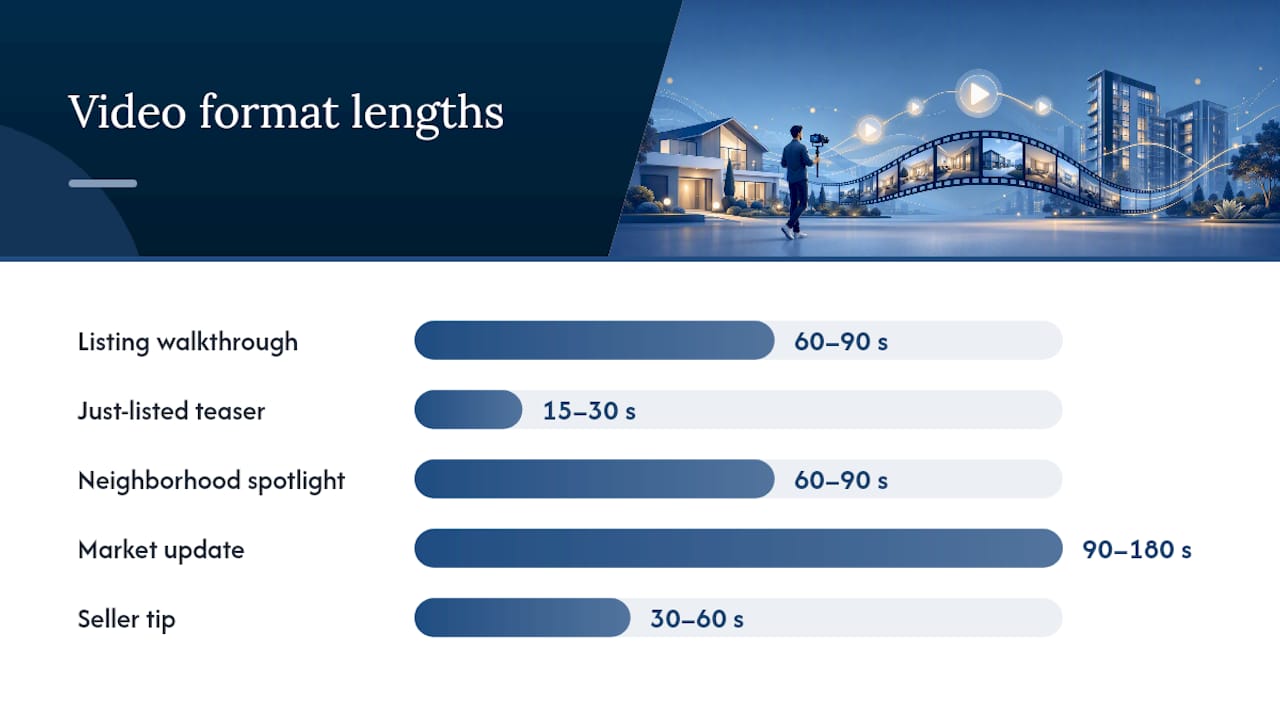
Platform length matters more than most agents think. Social clips run 15 to 30 seconds, a short tour runs 45 to 90 seconds, and a listing page video can stretch to 60 to 90 seconds because visitors there are already warm.
- Listing walkthrough (60 to 90 seconds)
- Just-listed teaser (15 to 30 seconds)
- Neighborhood spotlight (60 to 90 seconds)
- Market update (90 to 180 seconds)
- Seller tip / home-prep video (30 to 60 seconds)
A 60-second listing script runs about 130 to 150 spoken words, which is short enough to memorize on a drive to the showing. If you’d rather turn listing facts into a first draft automatically, Agentwrite builds script-ready copy from the same details you’d use to write MLS remarks, then flags Fair Housing wording before you hit record.
Key Takeaways
A repeatable four-beat script, hook, address, story, call, sized to each platform’s length is what separates videos that convert from videos that just get views.
| Point | Details |
|---|---|
| Use the four-beat structure | Hook, address, story, call, in that order, every time you script a video. |
| Match length to platform | Social runs 15 to 30 seconds; listing pages can run 60 to 90 seconds. |
| Lead the story beat with feeling | Describe what the camera can’t show instead of narrating visible features. |
| Make every CTA specific | Swap vague asks like “call me” for low-friction ones like “DM me TOUR.” |
| Draft faster with Agentwrite | Agentwrite turns listing inputs into a script-ready draft and flags Fair Housing wording automatically. |
Where to Learn More
- Tom Ferry’s script guide covers expert-backed delivery and confidence tips.
- Dunphy’s four-beat template breaks down timing and word counts per platform.
- 4D Production’s Florida broker guide offers detailed CTA and story-beat examples.
- Agentwrite generates listing copy and script drafts from the same property inputs.
Table of Contents
- Why a Real Estate Video Script Beats Winging It
- The Four-Beat Framework: What to Say and When
- Five Ready-to-Use Real Estate Video Script Templates
- How to Write a Real Estate Script in Under 15 Minutes
- Making the Script Sound Good on Camera
- Turn One Script Into Five Pieces of Content
- How AgentWrite Turns Listing Facts Into a Script-Ready Draft
- Personalizing Scripts for Luxury, Commercial, and Rental Listings
- Using Storytelling to Make Viewers Feel Something
- Optimizing Scripts for Retention and Conversion
- Sources
- FAQ
Why a Real Estate Video Script Beats Winging It
Agents who freestyle on camera tend to ramble, repeat themselves, or forget the one detail that actually sells the house. A script fixes that before the camera turns on, not after you’ve reshot the same walkthrough four times.
Tom Ferry’s team argues that a short outline, hook, talking points, local insight, call to action, lowers on-camera anxiety and makes agents sound more like themselves, not less. That’s counterintuitive to agents who assume scripts sound robotic. In practice, the opposite happens: nervous, unscripted delivery is what sounds stiff. A tight outline frees you to focus on tone and eye contact instead of scrambling for what to say next.
Scripts don’t box in your voice. They remove the guesswork, so what comes out on camera is closer to how you’d actually describe the house to a friend, not a stiffer version of you fumbling for the next sentence.
The four-beat structure works because it mirrors how buyers actually process a listing video: get curious, get informed, get emotionally invested, then get told what to do. Skip a beat and you lose the viewer at that exact point, usually right before the call to action, which is the one beat that actually generates business.
The Four-Beat Framework: What to Say and When
The four beats are hook, address and details, story, and call. Each one has a specific job, and mixing up the order is the fastest way to lose viewers before they see the kitchen.
- Hook (first 2 to 3 seconds). Open with a curiosity gap, not the address. Try: “This is the one feature every buyer asks about first” or “You won’t believe what’s behind this door.”
- Address and details (10 to 20 seconds on social, longer on a listing page). Cover square footage, bed and bath count, and the one or two specs that matter most to your target buyer.
- Story (15 to 40 seconds). Describe what the camera can’t show, morning light in the kitchen, the sound of the creek out back, the feeling of hosting on that deck. Story beats work best when they highlight what the lens misses, not what it’s already showing.
- Call (5 to 10 seconds). Give one specific, low-friction action. “DM me the word TOUR” beats “call for more information” every time.
Time allocation shifts by platform. A 15 to 30 second social clip compresses the hook to two seconds and the story to a single sentence. A 45 to 90 second short tour gives you room to breathe. A 60 to 90 second listing-page video, per Dunphy’s four-beat breakdown, can slow down and add context because that viewer already clicked in wanting more.
Pro Tip: Write your hook last. It’s easier to find the most surprising detail once you’ve already drafted the address and story beats.
Here’s the sequence in action for a hillside listing: “This backyard has a view most buyers drive an hour to find” (hook), “Three beds, two baths, just under 1,800 square feet in [Neighborhood]” (address), “Owners host sunset dinners up here every Friday” (story), “Link in bio for a private showing this week” (call). Leading with price or the street address kills the hook’s job before it starts.
Five Ready-to-Use Real Estate Video Script Templates
These five formats cover the videos agents post most often. Swap in your own listing details, and each one becomes a property marketing script you can shoot the same day.
1. Listing Walkthrough
Use this when you need a flagship video for a new listing. Social version runs 60 to 90 seconds; the listing-page version can run the same length but slow down on the story beat.
- Hook: “This is the kitchen that sold three buyers before they even saw the bedrooms.”
- Address: “[Bed count] bed, [bath count] bath, [square footage] square feet in [neighborhood].”
- Story: “Picture Sunday mornings on that island, coffee in hand, before the day gets busy.”
- Call: “DM me ‘TOUR’ and I’ll send you the private showing link today.”
2. Just-Listed Teaser
Use this the moment a listing hits the market, before the full walkthrough is even edited. Keep it to 15 to 30 seconds and lead entirely with the hook.
- Hook: “New listing just hit [neighborhood] and it won’t last the weekend.”
- Address: “[Price range or ‘call for pricing’], [bed/bath], [standout feature].”
- Call: “Comment ‘INFO’ and I’ll send the full listing your way.”
3. Neighborhood Spotlight
Use this to build authority in a zip code before you even have a listing there. Run 60 to 90 seconds and lean on local knowledge a national portal can’t replicate.
- Hook: “Here’s what nobody tells you about living in [neighborhood].”
- Story: “The farmers market on Saturdays, the walk to [local landmark], the school rated [detail if known].”
- Call: “Thinking about this area? Send me a message and I’ll walk you through it.”
4. Market Update
Use this monthly to stay visible between transactions. Structure it around three numbers: current inventory, average days on market, and median price movement, delivered in 90 to 180 seconds.
- Hook: “Here’s what actually happened in [market] last month, not what you read online.”
- Details: Three numbers, one takeaway each.
- Call: “Want to know what your home is worth in this market? Message me.”
5. Seller Tip / Home-Prep Video
Use this to attract future listings, not to sell a specific property. Keep it 30 to 60 seconds with one actionable tip.
- Hook: “This $200 fix added thousands to a recent sale.”
- Story: One quick example of a seller who benefited.
- Call: “Want a free walkthrough before you list? Link in bio.”
Run every script through a quick Fair Housing check before filming: avoid describing who a neighborhood is “perfect for,” steer clear of language implying a preferred family type, and never comment on a school’s demographics, only its ratings or programs. A tool like Agentwrite flags this kind of wording automatically while you’re still drafting.
How to Write a Real Estate Script in Under 15 Minutes
Start by gathering three inputs before you type a single word: the one-sentence unique feature of the property, who the ideal buyer actually is, and one specific neighborhood hook. Skipping this step is why most agents stare at a blank page.
- Research (3 minutes). Pull the unique feature, target buyer, and neighborhood detail straight from your listing notes or MLS sheet.
- Outline (5 minutes). Write one line per beat, hook, address, story, call, using the facts you just gathered. Five to seven lines total.
- Draft (5 minutes). Turn each outline line into a full sentence you’d actually say out loud, not write in an email.
- Refine (2 minutes). Cut anything over 20 words per sentence, remove real estate jargon like “turnkey” or “must-see,” and reread for Fair Housing red flags.
- Rehearse. Read it aloud twice, timing yourself on your phone. If a 60-second script reads long, you’re likely over the 130 to 150 word benchmark and need to trim, not speed up your delivery.
The editing checklist matters more than the drafting step. Agents who skip refinement end up narrating what the camera already shows, “and here’s the living room,” instead of adding what viewers can’t see on their own, like why the seller loved hosting there. Time your final draft with a stopwatch before you film. If it runs long, cut sentences from the middle, not the hook or the call. Those two beats do the heaviest lifting and deserve the least editing.
Making the Script Sound Good on Camera
Audio quality affects viewer retention more than lighting or camera resolution. Viewers will tolerate mediocre video with clear audio; they won’t tolerate the reverse. A $30 to $60 lavalier mic that clips to your collar solves most of the problem instantly.
- Frame talking-head segments at chest-up with your eyes near the top third of the frame, not centered.
- Use walkthrough footage, B-roll, to cover story beats so you’re not just staring at the lens for 90 seconds straight.
- Film near a window during daylight hours; natural light fixes most lighting problems for free.
- Add captions for every video since most viewers watch social clips with sound off.
- Use a clear, bright thumbnail frame, ideally the best exterior or feature shot, not a random freeze-frame.
Pro Tip: Leave price off the just-listed teaser and neighborhood spotlight scripts, but always include it on the listing-page and MLS versions. Curiosity drives clicks on social; transparency builds trust once someone’s already interested.
Put your CTA where the viewer’s thumb already is: “link in bio” for Instagram and TikTok, “comment below” for Facebook, and a direct booking link for email and listing pages.
Turn One Script Into Five Pieces of Content
Record once, then cut the same footage into a social teaser, a vertical Reel, a full listing video, an email clip, and an MLS caption drawn from the story beat.
- Post the teaser to Stories or Reels the day you film, with a comment-to-unlock CTA.
- Publish the full walkthrough to your listing page and YouTube within 48 hours, CTA: “Schedule a private showing.”
- Send the email clip to your buyer list that same week, CTA: “Reply if you’d like the full details.”
- Drop the MLS caption using language pulled straight from your story beat.
- Batch-record three properties in one session to build a week of content in an afternoon.
How AgentWrite Turns Listing Facts Into a Script-Ready Draft
Feeding an AI tool specific listing details, not vague prompts, produces usable first drafts you can personalize instead of generic filler. Agentwrite works the same way MLS remarks or a listing description would: you enter the property details once, and it generates copy in your voice, including a script-ready draft you can read straight into camera.
- Input the listing once: bed/bath count, unique features, neighborhood details.
- Generate a script draft alongside your MLS remarks and social captions.
- Select your writing voice so the tone matches how you actually talk on camera.
- Review the built-in Fair Housing flag before you film or publish anything.
The bottleneck for most agents isn’t talent on camera. It’s the fifteen minutes of staring at a blank page before they even pick up the phone to record.
The workflow is simple: input the listing, generate the draft, personalize a line or two for your own voice, then rehearse and film. Case studies and specific agent results will be added here as they become available.
Personalizing Scripts for Luxury, Commercial, and Rental Listings
A luxury listing script and a rental teaser shouldn’t sound the same, even if they follow the same four beats. The framework holds; the vocabulary, pacing, and story beat change based on who’s watching.
For luxury listings, slow the pacing down. A rushed 20-second luxury teaser undercuts the exclusivity you’re trying to project. Extend the story beat and lean into craftsmanship details, imported stone, a wine cellar’s temperature control, a custom staircase, rather than square footage alone. Your hook can afford to be quieter and more understated: “Some homes don’t need to shout” works better here than a high-energy teaser hook.
For commercial properties, the buyer isn’t imagining Sunday mornings, they’re running numbers. Shift the story beat toward business outcomes: foot traffic patterns, zoning flexibility, proximity to transit or parking capacity. Your call to action should target decision-makers directly: “Message me for the full financial package,” not a casual DM prompt.
For rentals, speed and clarity beat emotional storytelling. Renters move fast and compare many units in one sitting, so front-load availability date, price, and included utilities in the address beat. Keep the story beat to a single sentence, maybe the walk time to the nearest transit stop, and make the call as frictionless as possible: “Apply today, link in bio.”
The mistake agents make across all three niches is reusing one script’s tone everywhere. A market-update voice sounds cold on a luxury listing; a luxury script’s slow pacing kills momentum on a rental post that needs to convert in seconds.
Using Storytelling to Make Viewers Feel Something
The story beat is where most scripts fall flat, because agents default to narrating what’s already visible instead of adding what the camera can’t capture. “This is the primary bedroom” tells viewers nothing they can’t see for themselves.

Effective storytelling in a 60-second script means picking one sensory or emotional detail and committing to it fully rather than listing five features shallowly. Mention the way afternoon light hits the kitchen island during dinner prep, or the sound of the neighborhood on a Saturday morning walk. One vivid anecdote in the story beat does more work than four generic adjectives like “spacious” or “charming.”
A simple trick: write the story beat as if you’re describing the house to a friend who’s deciding whether to visit, not listing specs for an appraisal. That framing naturally pulls out emotional or sensory language instead of technical description.
If the listing has a genuine human element, a seller who raised three kids there, a garden they’ve tended for a decade, use it, but only if it’s real and you have permission to share it. Manufactured sentimentality reads as fake fast, and viewers notice. The goal isn’t to manipulate emotion; it’s to help someone picture their own life happening inside those walls.
Optimizing Scripts for Retention and Conversion
Retention starts with a ruthless first three seconds. If your hook doesn’t create a question in the viewer’s mind, curiosity about a feature, price, or story, most platforms will show your video to fewer people regardless of how good the walkthrough is.
Cut anything in the address beat that isn’t a top-three selling point. Agents often try to cram every feature into 90 seconds, which dilutes the ones that actually matter to their target buyer. Pick the two or three specs your ideal buyer cares about most and let the rest live in the listing description instead.
Match your call to action to the platform’s natural behavior. A vague “call me for more information” underperforms because it asks for a real commitment before trust is built. Specific, low-friction CTAs like “DM me the word TOUR” convert better because they ask for a small, easy first step.
Track the full funnel, not just views. Views tell you the hook worked. DMs or comments tell you the story and call landed. Booked showings tell you the whole script converted. An agent getting thousands of views but zero DMs almost always has a hook problem or a CTA problem, not a production quality problem. Test one variable at a time, swap only the hook on your next three videos, and watch which version pulls more comments before you touch anything else.
Author Note: What to Track This Week
Top producers track one funnel, not vanity metrics: views to DMs to booked showings. Pick one script format from this guide, run it three times this week, and watch where viewers drop off. If DMs stall, fix the call. If views stall, fix the hook.
Try AgentWrite for Your Next Listing Script
Every template above still starts with a blank page and fifteen minutes you might not have between showings. Agentwrite closes that gap: enter a property’s details once, and it drafts listing descriptions, MLS remarks, social captions, and a script-ready outline in your own voice, flagging Fair Housing wording issues before you ever hit record. That’s the difference between staring at a cursor and rehearsing a draft that’s already 80% done. If you’re juggling more than one active listing this month, start drafting with Agentwrite and see how much faster your next video gets from idea to filmed.
Sources
- Real Estate Video Scripts That Sell: A Guide for Florida Brokers – 4D Production
- Real estate video script: a four-beat template you can actually shoot | Dunphy
- Real Estate Video Scripts: 6 Proven Ideas, Examples, and Tips for Agents - Tom Ferry
FAQ
What Is the 3-3-3 Rule in Real Estate?
Interpretations vary by market and brokerage, so there’s no single agreed-upon definition; agents should confirm the version their team or region uses before applying it.
Can You Give an Example of a Real Estate Video Script?
Yes: “This backyard has a view most buyers drive an hour to find” (hook), “Three beds, two baths, under 1,800 square feet” (address), “Owners host sunset dinners here every Friday” (story), “DM me ‘TOUR’ for a private showing” (call).
Can You Give an Example of a Real Estate Agent Script for Cold Outreach?
A simple version: introduce yourself and your specialty in one line, reference a specific detail about the recipient’s situation, then ask one clear question, “Are you open to a quick call about your home’s value this month?”
What Are the Five P’s in Real Estate?
The “five P’s” aren’t a standardized industry framework, definitions differ across trainers and brokerages, so treat any specific list you encounter as one interpretation rather than a fixed rule.
How Long Should a Real Estate Video Script Be?
A 60-second script runs about 130 to 150 spoken words, while a 30-second social script runs closer to 60 to 80 words.
Can AgentWrite Help Write a Video Script?
Yes. Agentwrite generates a script-ready draft from the same listing details used for MLS remarks and descriptions, and it flags potential Fair Housing wording before you film.