

How to Syndicate Real Estate Listings Without Fair Housing Risk
How to Syndicate Real Estate Listings Without Fair Housing Risk

When agents talk about how to syndicate real estate listings, they usually mean writing the MLS remarks, portal blurbs, and marketing descriptions that get published everywhere the listing appears. That’s the sense used throughout this guide. The verdict: AI drafts these faster than any agent can type, but the listing agent and broker still carry full legal responsibility for every word. Use AI for first drafts only, and never publish without a human compliance pass.
- Draft with AI, verify with your eyes and your MLS rulebook.
- The National Association of Realtors’ Code of Ethics, specifically Article 2 and Article 12, still applies to AI-written copy exactly as it applies to your own.
- A missed pre-publish check is how a “cozy, family-friendly” AI suggestion turns into a Fair Housing complaint with your name on it.
Key Takeaways
AI can draft a listing description in seconds, but only a human agent’s fact-check and Fair Housing review makes that draft safe to publish.
| Point | Details |
|---|---|
| Agent liability stays put | NAR Article 2 and Article 12 hold the listing agent responsible regardless of who or what wrote the draft. |
| Run the pre-flight checklist | Screen every AI draft for coded language, buyer-targeting phrases, and unverified facts before it reaches the MLS. |
| Lead with verifiable features | Open with specific, checkable details instead of vague adjectives like “charming” or “must-see.” |
| Disclose staging clearly | Label virtually staged photos in the caption and, where required, in the remarks field itself. |
| Document every approval | Save prompts, drafts, edits, and sign-offs; AgentWrite logs this audit trail automatically as part of its workflow. |
Table of Contents
- Why Does Agent Liability Not Disappear With AI-Written Listings?
- What Is a Compliant AI Workflow for Listing Descriptions?
- What Separates Great Listing Copy From Forgettable Copy?
- Where Do MLS Character Limits and Staging Disclosures Actually Go?
- What AI Prompts and Templates Work Best for Listings?
- How AgentWrite Fits Into a Compliance-First Listing Workflow
- Sources
- FAQ
Why Does Agent Liability Not Disappear With AI-Written Listings?
Nothing about pasting text from a chatbot changes who signed the listing agreement. NAR guidance and industry coverage make clear that agents and brokers keep full responsibility for the accuracy and Fair Housing compliance of remarks, no matter which tool produced the draft. Article 2 obligates you to present listings accurately; Article 12 governs truthful advertising. AI output can violate both without anyone intending it to.
The failure mode is predictable. Large language models are trained on decades of real estate copy, some of it written during eras when steering language was normal. Ask a generic AI tool for a “family-friendly” description and it may hand you exactly that phrase, unaware it’s a classic coded term tied to housing discrimination cases. Other common slip-ups: an AI inventing an amenity that isn’t in your notes, describing a neighborhood as “safe” or “exclusive,” or failing to flag that the listing photos were virtually staged.
Industry guidance is blunt on this point: AI does not remove liability, and unreviewed output creates real fair housing risk alongside plain factual errors.
The broker-level risk compounds the individual one. An office full of agents pasting unreviewed AI copy into the MLS is an audit nightmare waiting to happen.
- Fair Housing complaints trace back to the listing agent, not the AI vendor.
- MLS boards can suspend posting privileges for repeated remarks violations.
- Undisclosed virtual staging invites both regulatory scrutiny and buyer distrust once discovered.
- Keeping no record of prompts, drafts, and final edits leaves you with no defense if a complaint surfaces months later.
What Is a Compliant AI Workflow for Listing Descriptions?
Treat AI-generated copy the way you’d treat a draft from a junior assistant: useful, fast, and never final until you’ve signed off on it. The workflow that actually holds up under scrutiny runs in a fixed order, and skipping steps is where trouble starts.
Start by gathering the property facts yourself: square footage, year built, verified upgrades, lot details, HOA specifics. Feed those into a structured prompt built on five layers: objective facts, standout features, buyer persona (used only to set tone, never to appear in the output), emotional narrative, and a call to action. That five-layer prompt structure consistently produces more usable drafts than a one-line request like “write a listing description.” Generate two or three variations, then edit the strongest one for voice and factual precision before anything touches your MLS input screen.
Here’s the pre-flight checklist to run every single time, before you paste AI copy anywhere public:
- Confirm every claim is an objective, verifiable fact, not an assumption the AI filled in.
- Strip any language aimed at a type of buyer (“perfect for retirees,” “great starter home for young couples”).
- Scan for coded terms tied to protected classes, including “walking distance to church,” “quiet neighborhood,” or “exclusive.”
- Fact-check square footage, school names, and any numeric claim against your source documents.
- Remove any personal information about sellers, tenants, or neighbors that shouldn’t be public.
- Confirm virtually staged photos carry a disclosure and that the wording matches your MLS’s required format.
- Check the copy fits your MLS field’s character limit and that formatting survives the paste.
- Have a licensed agent sign off, timestamp the approval, and store the prompt, draft, and final version together.
This kind of documented review is what HousingWire’s fair housing checklist recommends as the baseline safe practice, and it’s also the record you want on hand if a regulator or your broker ever asks how a listing got written. Store that audit trail somewhere retrievable: your broker’s transaction management system, a shared compliance folder, or a tool like AgentWrite that logs prompts and edits automatically.
Pro Tip: Run your AI draft through the checklist out loud, reading it as a buyer with no context would. Coded language and vague filler both jump out faster when you hear them than when you skim them.
AI flags help here, but they’re a backstop, not a substitute. A model can catch an obvious phrase like “safe neighborhood.” It won’t catch that your “recently renovated kitchen” claim is based on a five-year-old photo, or that the seller quietly asked you not to mention the shared driveway. Only you know that context.
What Separates Great Listing Copy From Forgettable Copy?
The best-performing listing descriptions lead with the single most compelling, verifiable feature in the first sentence, not a generic opener about “an opportunity you won’t want to miss.” Specific, checkable nouns do the heavy lifting: brand names, exact measurements, years, materials. Realtor puts it plainly: features first, filler last, and tone matched to the actual property and market rather than a template.
Do this:
- Open with the strongest, most factual selling point: “Chef’s kitchen with a six-burner Wolf range and quartz counters.”
- Use active verbs tied to concrete details rather than adjectives alone.
- Match tone to the property. A downtown loft and a suburban colonial shouldn’t read the same.
Avoid this:
- Buyer-targeted phrases like “ideal for young professionals” or “perfect for a growing family.”
- Coded descriptors: “exclusive,” “safe,” “desirable area,” “walking distance to [religious institution].”
- Vague adjectives that say nothing: “charming,” “must-see,” “won’t last.”
A listing that says “hardwood floors throughout, refinished in 2024” tells a buyer more, and risks less, than one that calls the home “charming and move-in ready.”
Here’s a rewrite side by side:
Before: “This charming home is perfect for a young family looking for their forever home in a safe, quiet neighborhood.”
After: “This 1948 brick colonial features original hardwood floors, a 2023 roof replacement, and a fenced backyard with mature oak trees.”
Same property, zero legal exposure, and arguably more persuasive because it’s specific. A four-part structure of lead line, lifestyle detail, facts block, and call to action tends to outperform free-form paragraphs for exactly this reason: it forces you to separate feeling from filler.
For length, aim for a punchy 15 to 20 word opening line, and keep total MLS remarks tight since most systems truncate around 500 to 1,000 characters depending on the board. Save the longer, 300 to 450 word version for your website or portal listing page, where space isn’t the constraint.
Pro Tip: Write your MLS remarks last, after the longer website description. It’s easier to cut a great paragraph down than to stretch a thin one out.
Where Do MLS Character Limits and Staging Disclosures Actually Go?
MLS remarks fields vary by board, but plan for roughly 500 to 1,000 characters and always confirm your specific board’s limit before you write. Portal blurbs (public-facing marketing descriptions) usually allow more room, often 300 to 450 words, which is where the fuller narrative belongs.
Virtual staging disclosures need to live in two places: the photo caption itself (“Virtually staged”) and, depending on your MLS rules, a line in the remarks. Don’t bury it in fine print. Fair Housing guidance on AI-generated copy treats an undisclosed staged photo as a materially misleading representation, not a stylistic choice.
- Keep a copy of every approved draft, along with the prompt that generated it, in your broker’s system or a dedicated compliance folder.
- Watch for portal truncation: some sites cut text mid-sentence at their own character limit, so test how your description displays before publishing.
- Special characters (curly quotes, em dashes, bullet symbols) sometimes break when pasted into rich-text MLS fields; paste as plain text first, then format.
- If a portal supports HTML formatting, confirm bold and line breaks render correctly instead of showing raw tags.
Pro Tip: Keep one master version of the full description and trim it down for the MLS, rather than writing two versions from scratch. It keeps facts consistent across every place the listing appears.
What AI Prompts and Templates Work Best for Listings?
A short MLS template: headline (under 15 words) → two to three sentence lead with the top feature → a facts block (beds, baths, square footage, lot size, year built) → a one-line call to action. That structure fits inside most character limits without feeling clipped.
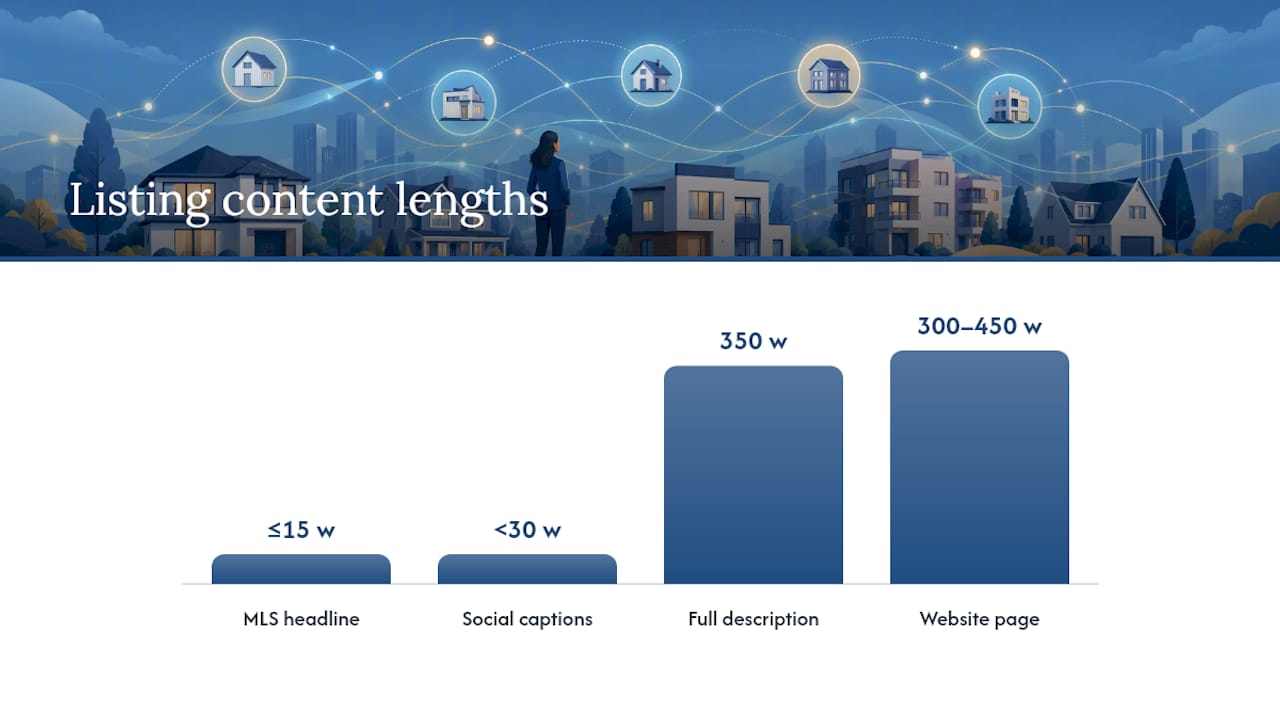
For your website or portal page, stretch the same bones into 300 to 450 words: open with the strongest feature, add a paragraph of lifestyle detail grounded in real facts, close with a facts block and CTA. Save a shorter, two-sentence version for social captions.
Three prompt templates worth saving:
- Full description prompt: “Using these property facts [paste facts], write a 350 word listing description. Lead with [top feature]. Tone should match a [property type] in [market type]. End with a call to action inviting a showing request.”
- MLS-safe prompt: “Write a 400 character MLS remarks paragraph using only these verified facts [paste facts]. Do not mention buyer type, lifestyle fit, or neighborhood character. Use only checkable details.”
- Social caption prompt: “Write three short social captions (under 30 words each) highlighting [top feature] and [second feature], with no buyer-targeting language.”
Save each prompt alongside its output as one asset pack per listing. Consultancies like C3 Dynamic Solutions publish similar prompt-construction guidance if you want more variations to test against your own listings.
A quick note on adopting this workflow
Speed from AI is real, but it only pays off when an agent protects the client and the brand with a documented approval step every time, no exceptions. What you bring that AI can’t: local knowledge, judgment about context, and a voice buyers recognize as yours.
How AgentWrite Fits Into a Compliance-First Listing Workflow
AgentWrite was built around exactly this problem: agents need speed without losing the human judgment that keeps listings compliant. Enter a property’s details once, and it generates MLS remarks, portal blurbs, social posts, and even seller pitch materials in your selected voice, so you’re not rewriting the same facts five different ways for five different formats.
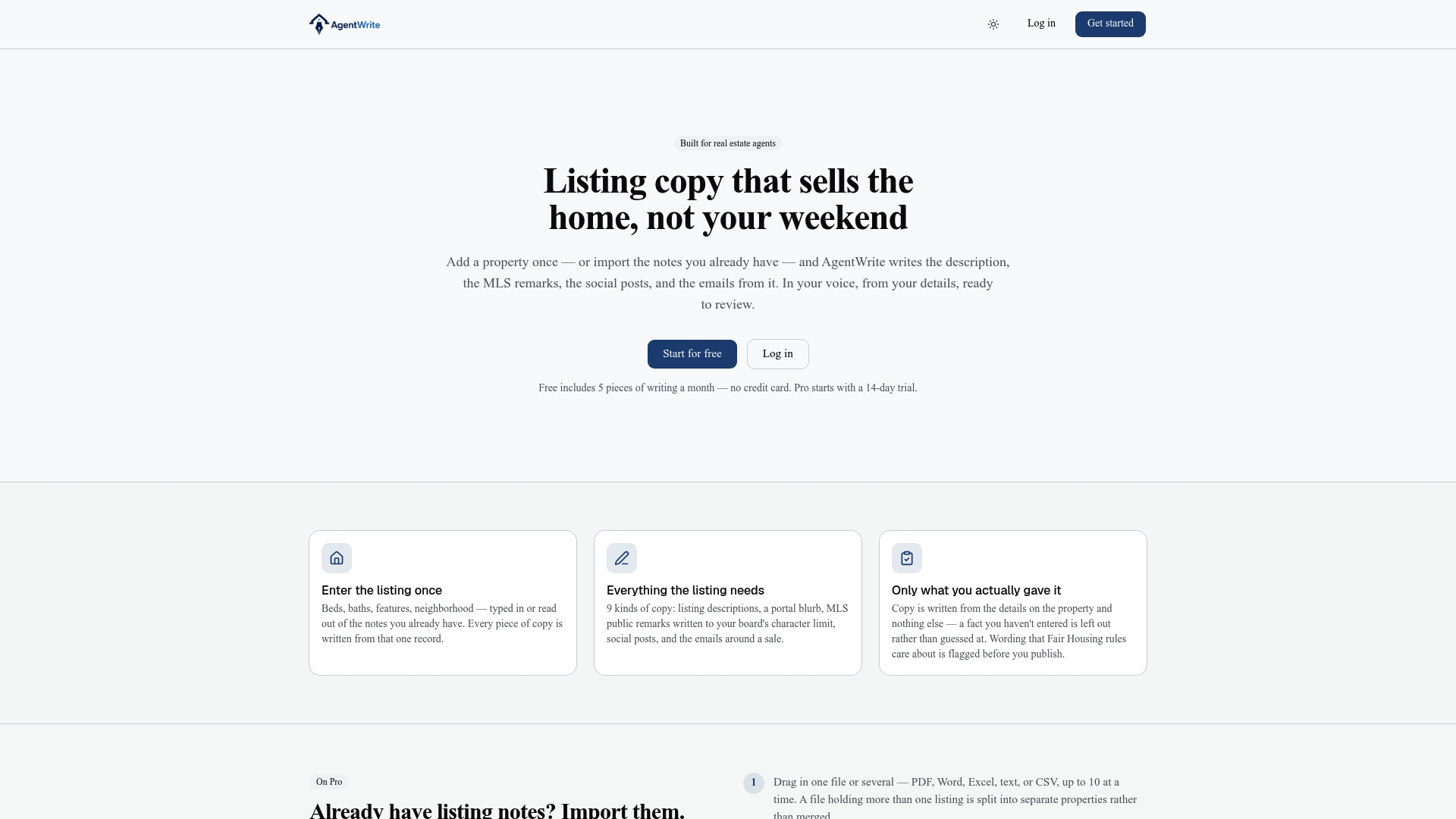
The platform flags potential Fair Housing wording before you ever see the draft, which shortens your compliance scan instead of replacing it. Every prompt, draft, edit, and final version gets logged automatically, so the audit trail this guide recommends builds itself as you work rather than becoming a separate task. The workflow in practice: generate your draft, review AgentWrite’s built-in wording flags, make your edits for voice and accuracy, then export MLS-ready copy or send it straight to your broker’s transaction system.
If you’re syndicating listings across MLS, your website, and social media every week, try AgentWrite and see how much of the formatting and flagging work disappears from your afternoon.
Sources
- AI fair housing remarks checklist — HousingWire
- Realtor
- AI Listing Descriptions in 2026: How 68% of Agents Are Using AI Copywriting — Tech & Real Estate
- Fair Housing and AI-Generated Listing Copy — Caidance
FAQ
Does AI-generated listing copy still need Fair Housing review?
Yes. NAR guidance and Article 2/12 obligations apply to AI drafts exactly as they apply to agent-written copy, so every draft needs a human compliance check before publication.
What counts as coded language to avoid in listing remarks?
Phrases like “family-friendly,” “safe neighborhood,” “exclusive,” or references to nearby religious institutions can signal buyer steering and should be replaced with objective, verifiable facts.
How long should MLS remarks be?
Most MLS boards allow roughly 500 to 1,000 characters, though the exact limit varies by board, so confirm your local field length before finalizing copy.
Do virtually staged photos need a disclosure?
Yes, virtually staged images need a caption disclosure and, depending on your MLS rules, a line in the remarks stating the photo was virtually staged.
Can a tool like AgentWrite replace the human approval step?
No. AgentWrite flags potential Fair Housing wording and logs prompts and edits to speed review, but a licensed agent still has to complete the final fact-check and sign-off before publishing.